Colour in Patterning
There are now several ways to talk about colours in Patterning
p-color
Colours can be defined with the function p-color which takes 1, 3 or 4 arguments whose values are between 0 and 255.
A single argument will give you a shade of grey between black (0) and white (255). Three arguments will get mapped to red, green and blue components. Four arguments will get mapped to red, green, blue and alpha (transparency) components.
A transparent green : (p-color 150 255 150 150)
hex-color
For those more used to HTML / CSS / SVG style colours there's a new function called hex-color that takes a string of hex numbers
(hex-color "ff3399")
It also supports transparency by adding a fourth hex number at the end. Eg. "ff339988"
defcolor
Often you might want to make a palette of colours which you'll re-use throughout your pattern. It's a bit verbose to define these with p-color every time you want to use them, so you'll end up doing something like
(def my-orange (p-color 240 240 50))
As this is verbose we now have a convenience macro defcolor which lets you define colours and use either numbers like p-color or strings like hex-color
(defcolor black 0)
(defcolor green 50 250 70)
(defcolor cyan "00ddff")
etc.
defpalette
If you want a whole named palette at once, use defpalette. It creates both
individual colour vars and a map keyed by keywords.
(defpalette ocean
  deep-blue "002244"
  sea "3388aa"
  foam [200 240 255]
  kelp '(30 80 40))
This gives you deep-blue, sea, foam, kelp in the global namespace,
and the map ocean:
(paint deep-blue sea 2)
(ocean :sea)
Standard palette
There is a built-in macro that defines a default palette of 32 standard colours with English names.
(set-standard-colors)
This creates:
- individual vars like red, blue, light-grey, turquoise, crimson
- a map called standard-colors that you can use with keywords:
(:turquoise standard-colors)
Example:
(set-standard-colors)
(paint navy turquoise 2)
Make a style with paint
Styles are just Clojure maps. But can sometimes look confusing to beginners. The convenience paint function just takes three arguments, stroke colour, fill colour and stroke weight and makes that style
(paint (p-color 255 0 0) (p-color 255 255 0) 2)
We've also predefined the basic colours and can refer to them with keywords, eg.
(paint :red :yellow 3)
Note that this shorthand for red, yellow etc. using keywords is only supported in the colour function. And is there to help beginners get going quickly without having to learn everything about colours and style. **
Background colour
Previously if you wanted to set a background colour for your pattern you always needed to stack a coloured square behind it.
Again, for convenience, we now have the on-background function which does that for you. It takes a colour and a pattern.
(on-background black my-pattern)
Changing the colours of an existing pattern
We can over-ride or supplement the styling of an existing function using the over-style function.
In the following example we supplement an already bright green clock-rated drunk-line with a transparent green fill. Note that the drunk-line is not closed but can still be filled.
And to see the transparency we can stack it on top of a basic grid of squares.
(set-standard-colors)
(defcolor transparent-green (faint green 100))


(on-background black
  (stack
    (grid 10 (square {:stroke-weight 2, :stroke purple}))
    (over-style
      {:fill transparent-green}
      (clock-rotate 12
        (drunk-line 20 0.05 {:stroke green :stroke-weight 3})))))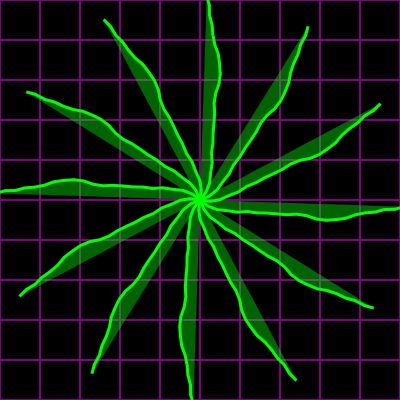
Continue to Functional Power for Patterning